> ## Documentation Index
> Fetch the complete documentation index at: https://dodopayments-mintlify-external-integration-datafast-autosen.mintlify.site/llms.txt
> Use this file to discover all available pages before exploring further.
# License Keys
> Securely generate, manage, and track license keys for your digital products with advanced access control and revocation.
Issue unique keys for your software or digital goods, control activations, and revoke access when needed. License keys pair well with subscriptions and one-time purchases.
## What Are License Keys?
License keys are unique tokens that authorize access to your product. They're ideal for:
* **Software licensing**: Desktop apps, plugins, and CLIs
* **Per-seat controls**: Limit activations per user or device
* **Digital goods**: Gate downloads, updates, or premium features
## Key Benefits
* **Access control**: Define expiry and activation limits
* **Operational visibility**: Track usage, devices, and history
* **Security and support**: Disable, re-enable, and audit quickly
## Creating License Keys
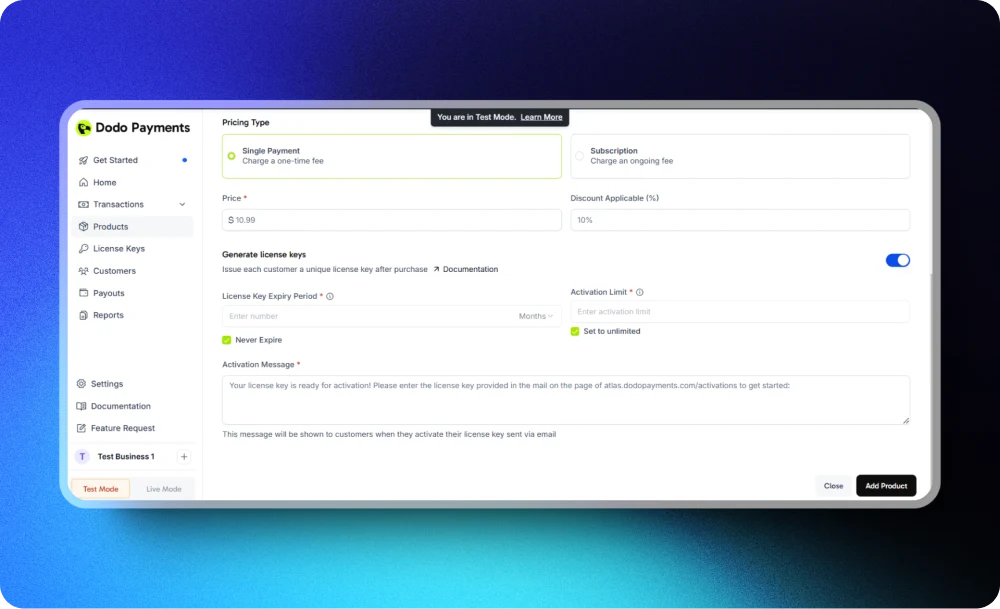
Go to your Dodo Payments dashboard and open the License Keys section. Select the option to create a new license key.
Set how your license keys will be issued and used by specifying these fields:
* **License Key Expiry Date**: Define how long the key stays valid. Choose a specific duration (for example, 30 days or 1 year), or select "no expiry" for a perpetual key.
* **Activation Limit**: Set the maximum number of concurrent activations per key. Use a specific number for scenarios like single-user (1) or team licenses (5), or select "unlimited" for no activation cap.
* **Activation Instructions**: Provide clear activation steps for your customers, which will also be emailed with the license key. Examples: "Paste the key in Settings → License" or "Run: `mycli activate `".
Check all entered details. When ready, save the license key configuration to finish key creation.
Use realistic instructions and include support links to reduce activation tickets.
## Manage & Monitor
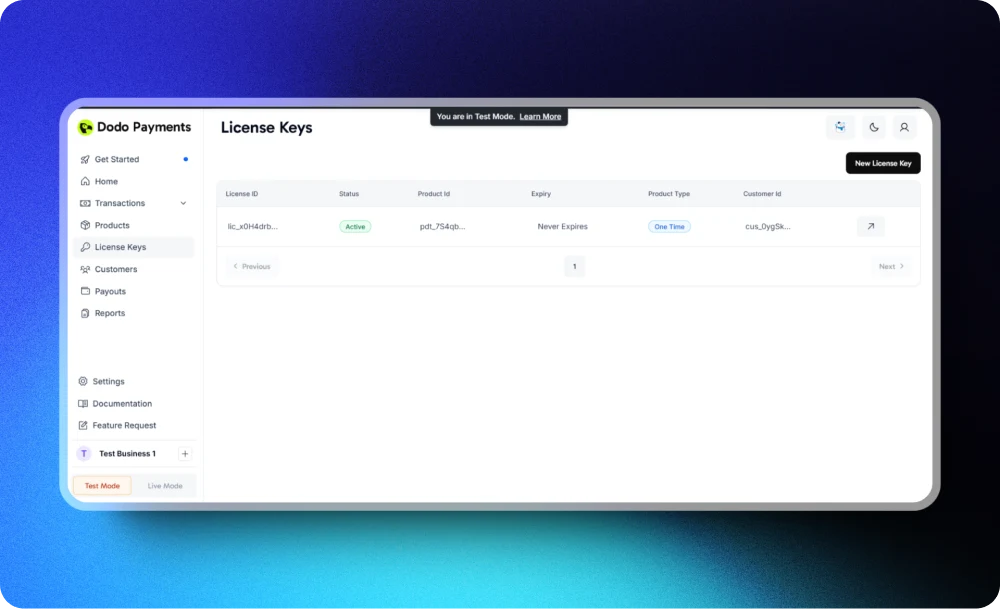
The **License Keys Section** provides a comprehensive view of all license key activity and enables you to manage and monitor licenses effectively.
### Key Information
View detailed information for each license key:
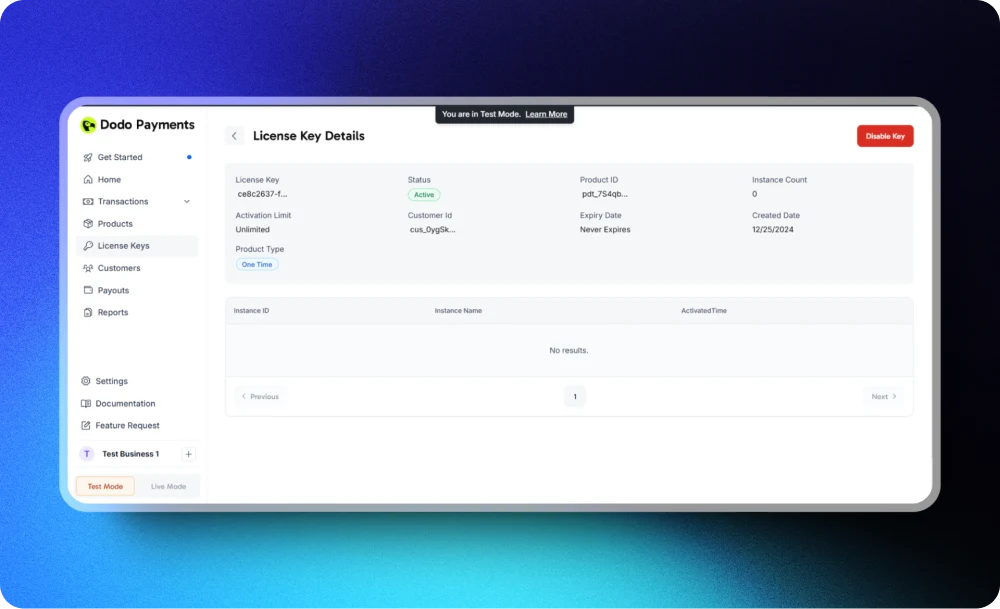
* **Key Details**: License key value, associated product name, customer details (customer\_id), and purchase date
* **Usage Activity**: Number of activations, activation dates and times, and status (active, expired, disabled)
* **Expiry and Limits**: Key expiry date, remaining activation count, and current activation instances
### Available Actions
You can perform the following actions on license keys:
* **Disable License Key**: Immediately disable a key to prevent further usage
* **Enable Key**: Re-enable a previously disabled license key
* **View Activation Instances**: See all associated activation instances for a particular license key
### Benefits
* Track license key activity in real-time
* Identify potential misuse or unauthorized activations
* Simplify customer support by providing detailed usage records in case of discrepancy
## API Management
Use these APIs to activate, validate, list, and update license keys and their activation instances.
**Public Endpoints**: The activate, deactivate, and validate license endpoints are **public** and do **not require an API key**. This allows you to call them directly from your client applications, desktop software, or CLIs without exposing your API credentials.
Trigger activation, deactivation, and validation actions on license keys.
Create or record an activation instance for a license key.
Revoke a prior activation to free up capacity.
Check authenticity, status, and constraints before granting access.
List, retrieve, and update license keys with their settings and status.
Browse all keys with status and usage details.
Retrieve a specific key and its metadata.
Modify expiry, activation limits, or enable/disable a key.
Work with individual device activations for each key.
Return all activation instances for a specific key.
Fetch details for a single activation instance.
Revoke or update device information for an instance.
## Integration Examples
### Activate a license
These endpoints do not require an API key and can be called directly from your client applications.
```typescript TypeScript/Node.js theme={null}
import DodoPayments from 'dodopayments';
// No API key needed for public license endpoints
const client = new DodoPayments();
const response = await client.licenses.activate({
license_key: 'license_key',
name: 'Device Name'
});
console.log(response.id);
```
```bash cURL theme={null}
curl -X POST https://api.dodopayments.com/licenses/activate \
-H "Content-Type: application/json" \
-d '{
"license_key": "your_license_key",
"name": "Device Name"
}'
```
### Validate a license
```typescript TypeScript/Node.js theme={null}
import DodoPayments from 'dodopayments';
// No API key needed for public license endpoints
const client = new DodoPayments();
const response = await client.licenses.validate({
license_key: '2b1f8e2d-c41e-4e8f-b2d3-d9fd61c38f43'
});
console.log(response.valid);
```
```bash cURL theme={null}
curl -X POST https://api.dodopayments.com/licenses/validate \
-H "Content-Type: application/json" \
-d '{
"license_key": "2b1f8e2d-c41e-4e8f-b2d3-d9fd61c38f43"
}'
```
## Best Practices
* **Keep limits clear**: Choose sensible defaults for expiry and activations
* **Guide users**: Provide precise activation instructions and self-serve documentation
* **Automate checks**: Validate keys server-side before granting access
* **Monitor events**: Use webhooks to detect abuse and automate revocations
 ## Manage & Monitor
The **License Keys Section** provides a comprehensive view of all license key activity and enables you to manage and monitor licenses effectively.
### Key Information
View detailed information for each license key:
* **Key Details**: License key value, associated product name, customer details (customer\_id), and purchase date
* **Usage Activity**: Number of activations, activation dates and times, and status (active, expired, disabled)
* **Expiry and Limits**: Key expiry date, remaining activation count, and current activation instances
## Manage & Monitor
The **License Keys Section** provides a comprehensive view of all license key activity and enables you to manage and monitor licenses effectively.
### Key Information
View detailed information for each license key:
* **Key Details**: License key value, associated product name, customer details (customer\_id), and purchase date
* **Usage Activity**: Number of activations, activation dates and times, and status (active, expired, disabled)
* **Expiry and Limits**: Key expiry date, remaining activation count, and current activation instances
 ### Available Actions
You can perform the following actions on license keys:
* **Disable License Key**: Immediately disable a key to prevent further usage
* **Enable Key**: Re-enable a previously disabled license key
* **View Activation Instances**: See all associated activation instances for a particular license key
### Available Actions
You can perform the following actions on license keys:
* **Disable License Key**: Immediately disable a key to prevent further usage
* **Enable Key**: Re-enable a previously disabled license key
* **View Activation Instances**: See all associated activation instances for a particular license key
 ### Benefits
* Track license key activity in real-time
* Identify potential misuse or unauthorized activations
* Simplify customer support by providing detailed usage records in case of discrepancy
## API Management
Use these APIs to activate, validate, list, and update license keys and their activation instances.
### Benefits
* Track license key activity in real-time
* Identify potential misuse or unauthorized activations
* Simplify customer support by providing detailed usage records in case of discrepancy
## API Management
Use these APIs to activate, validate, list, and update license keys and their activation instances.